> ## Documentation Index
> Fetch the complete documentation index at: https://docs.simpletool.org/llms.txt
> Use this file to discover all available pages before exploring further.
# 🌪️ Windsurf
> SimpleTool Server can be integrated with Windsurf to provide additional AI capabilities through the Model Context Protocol (MCP). This integration allows Windsurf to access SimpleToolServer powerful tools and features.
## 🔌 Configuration
To connect Windsurf with SimpleTool Server, you need to configure the MCP connection in Windsurf's configuration file.
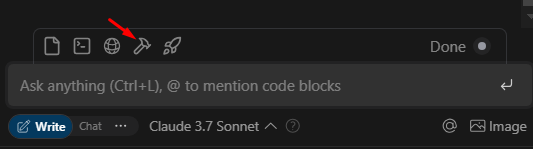
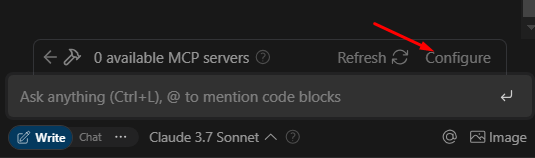
### 📁 Step 1: Locate the MCP Configuration File
The MCP configuration file is typically located at:
```
~/.codeium/windsurf/mcp_config.json
```
 ### ⚙️ Step 2: Configure the SSE Connection
Add the SimpleTool Server as an MCP server in your configuration file. You'll need to specify:
1. A server name
2. The server URL (pointing to your SimpleTool Server's MCP SSE endpoint)
3. The transport type (SSE)
Here's an example configuration:
```json theme={null}
{
"mcpServers": {
"simpletool-sse-server": {
"serverUrl": "http://localhost:8000/mcp/sse",
"transport": "sse"
}
}
}
```
Replace `localhost` with the IP address or hostname of your SimpleTool Server.
### ✅ Step 3: Verify the Connection
After configuring the MCP connection, hit `Refresh` in your Windsurf application to apply the changes. You should now be able to access SimpleTool's MCP Tools through Windsurf.
## 🧰 Available Tools
Once connected, Windsurf will have access to all the tools enabled in your SimpleTool Server. These may include:
* 🌐 Web browsing capabilities
* 🔄 HTTP request tools
* ⏰ Time conversion utilities
* 📚 Documentation search
* 🔍 And more, depending on your SimpleTool Server configuration
## 🔍 Troubleshooting
If you encounter issues with the integration:
1. 🔄 Verify that your SimpleTool Server is running and accessible
2. 🔗 Check that the server URL in your MCP configuration is correct
3. 🚢 Ensure the transport type is set to "sse"
4. 🧱 Check if any firewalls are blocking the connection
For advanced configuration options, refer to the [⚙️ Environment Variables](/essentials/env) documentation.
### ⚙️ Step 2: Configure the SSE Connection
Add the SimpleTool Server as an MCP server in your configuration file. You'll need to specify:
1. A server name
2. The server URL (pointing to your SimpleTool Server's MCP SSE endpoint)
3. The transport type (SSE)
Here's an example configuration:
```json theme={null}
{
"mcpServers": {
"simpletool-sse-server": {
"serverUrl": "http://localhost:8000/mcp/sse",
"transport": "sse"
}
}
}
```
Replace `localhost` with the IP address or hostname of your SimpleTool Server.
### ✅ Step 3: Verify the Connection
After configuring the MCP connection, hit `Refresh` in your Windsurf application to apply the changes. You should now be able to access SimpleTool's MCP Tools through Windsurf.
## 🧰 Available Tools
Once connected, Windsurf will have access to all the tools enabled in your SimpleTool Server. These may include:
* 🌐 Web browsing capabilities
* 🔄 HTTP request tools
* ⏰ Time conversion utilities
* 📚 Documentation search
* 🔍 And more, depending on your SimpleTool Server configuration
## 🔍 Troubleshooting
If you encounter issues with the integration:
1. 🔄 Verify that your SimpleTool Server is running and accessible
2. 🔗 Check that the server URL in your MCP configuration is correct
3. 🚢 Ensure the transport type is set to "sse"
4. 🧱 Check if any firewalls are blocking the connection
For advanced configuration options, refer to the [⚙️ Environment Variables](/essentials/env) documentation.